A Developer’s Journey to the Cloud 2: My Database Lived in a Shoebox, and I Didn’t Even Know It
Managed Database
Search for a command to run...
Managed Database
No comments yet. Be the first to comment.
"A Developer’s Journey to the Cloud," a narrative series blending memoir and guide. It draws from 8 years of the author's real-world app development experiences, focusing on the 'why' behind key decisions, not just tutorials.
My Deployments Were a Ritual, Not a Process We've come so far. Our application is neatly containerized in Docker, and our data is safe and sound in managed cloud services. I had eliminated the "works on my machine" curse and outsourced my 3 AM data-l...
Trapped in a Digital Echo Chamber
Why Consuming More Doesn't Move You Forward
What Shiva and the Bhagavad Gita Teach Us About Love and Action

We’ve all been there. You start a new diet, a new workout routine, or a new creative project with a burst of motivation. For a few days, or maybe even two weeks, you’re unstoppable. And then, suddenly, you’re not. You skip one gym session. You order ...

Kintsugi for the Soul: Why Your Cracks Matter

We did it. In the last post, we took our application, boxed it up with Docker, and shipped it to a server. It was running, stable, and consistent. The "works on my machine" curse was broken. I felt like I had conquered the cloud.
For about a week, I was a DevOps king, basking in the glory of my perfectly containerized world.
Then, one evening, as I was about to shut my laptop, a cold thought washed over me:
Where does my data actually live?
It hit me like a bad database query: my entire database, every user, every post, every precious row of information was running inside that same Docker container, on that same single server.
And it wasn’t just the database. My user-uploaded images? Just sitting in a /uploads folder on that same hard drive, quietly piling up like old photos in a forgotten attic.
The whole thing was one fragile digital shoebox. If the lid blew off (or the drive failed), it would all scatter into the void.
That night I lay in bed thinking about rm -rf / nightmares and spinning disks giving their last click of life.
What if the server’s hard drive failed? It’s just a machine, after all. Everything would be gone. Instantly.
What about backups? Sure, I could write a script, maybe a cron job:
pg_dump mydb > backup.sql
But… where would that backup go? Another folder? On the same server? That’s like hiding your spare house key under the doormat of a house that’s on fire.
The more I thought about it, the more absurd it became.
I started Googling “how to back up a database properly” and promptly fell into a black hole: replication strategies, point-in-time recovery, WAL archiving, security patching.
I wasn’t just a developer anymore, I was now an unwilling, unqualified, and mildly terrified part-time Database Administrator and Storage Manager.
This wasn’t the dream. The dream was building my app, not babysitting a database and a pile of user images like some digital hoarder.
Defeated, I wandered through my cloud provider’s dashboard, clicking through services with names I didn’t fully understand.
And then I saw them two shiny lifeboats in a sea of uncertainty:
Relational Database Service (RDS): “A managed relational database service... handles provisioning, patching, backup, recovery, failure detection, and repair.”
Simple Storage Service (S3): “Object storage designed to store and retrieve any amount of data... with 99.999999999% durability.”
It was almost comical. Of course the cloud companies were good at this. This is their entire business!
Here I was, ready to script a janky nightly backup, while they had teams of engineers whose only job was to make sure data never disappears.
The next day, I stopped being stubborn and started migrating.
With a few clicks, I spun up an RDS instance. Automatic backups? done High availability? done Security patches? done
I just updated my app’s connection string:
DATABASE_URL=postgres://user:password@database-1.abcdefghij12.us-east-1.rds.amazonaws.com:5432/mydb
Instead of saving files locally, I integrated the S3 SDK and changed my upload logic:
s3.upload({
  Bucket: "my-app-bucket",
  Key: `uploads/${file.name}`,
  Body: file.data
});
Suddenly, my images weren’t trapped in /uploads; they were in a globally redundant, highly durable vault.
From the outside, my app looked exactly the same. But beneath the surface, the foundation had gone from a shoebox on a wobbly shelf to a bank vault inside a fortress.
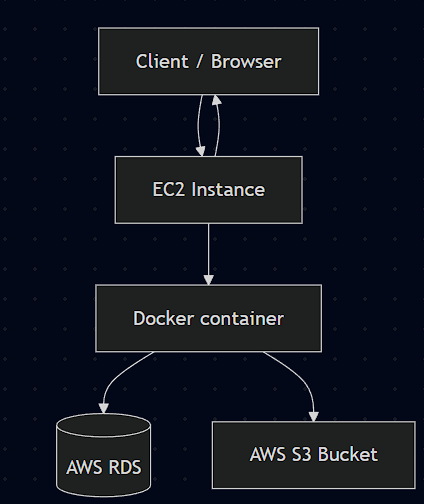
I was no longer the single point of failure. I could finally focus on writing code without the looming fear of catastrophic data loss.
Even with the data safe, I still had to deploy my code the old-fashioned way: SSH into the server, run some commands, cross my fingers, and hope nothing broke.
It felt clunky. Slow. Archaic. There had to be a better way.
Next up: A Developer’s Journey to the Cloud 3: Building a CI/CD Pipeline.